No quote goes cold
The clients who say "let me think about it" hear from you again, in your firm's name, while the quote is still fresh.
Subcontext
Subcontext is in IRESS's The Exchange. Export a quote, and our AI assistant follows your client up in your firm's name, answers their questions from the prices you quoted, and brings them back to you ready to apply.
Why advisers use it
The clients who say "let me think about it" hear from you again, in your firm's name, while the quote is still fresh.
Your client, their cover and every price come across from The Exchange exactly as you quoted them.
You approve the first message. The assistant answers questions from the quotes and never gives advice, so the recommendation and the sale stay yours.
When your client is ready, Continue in IRESS takes you straight back to their quote in The Exchange to apply.
How it works
In The Exchange
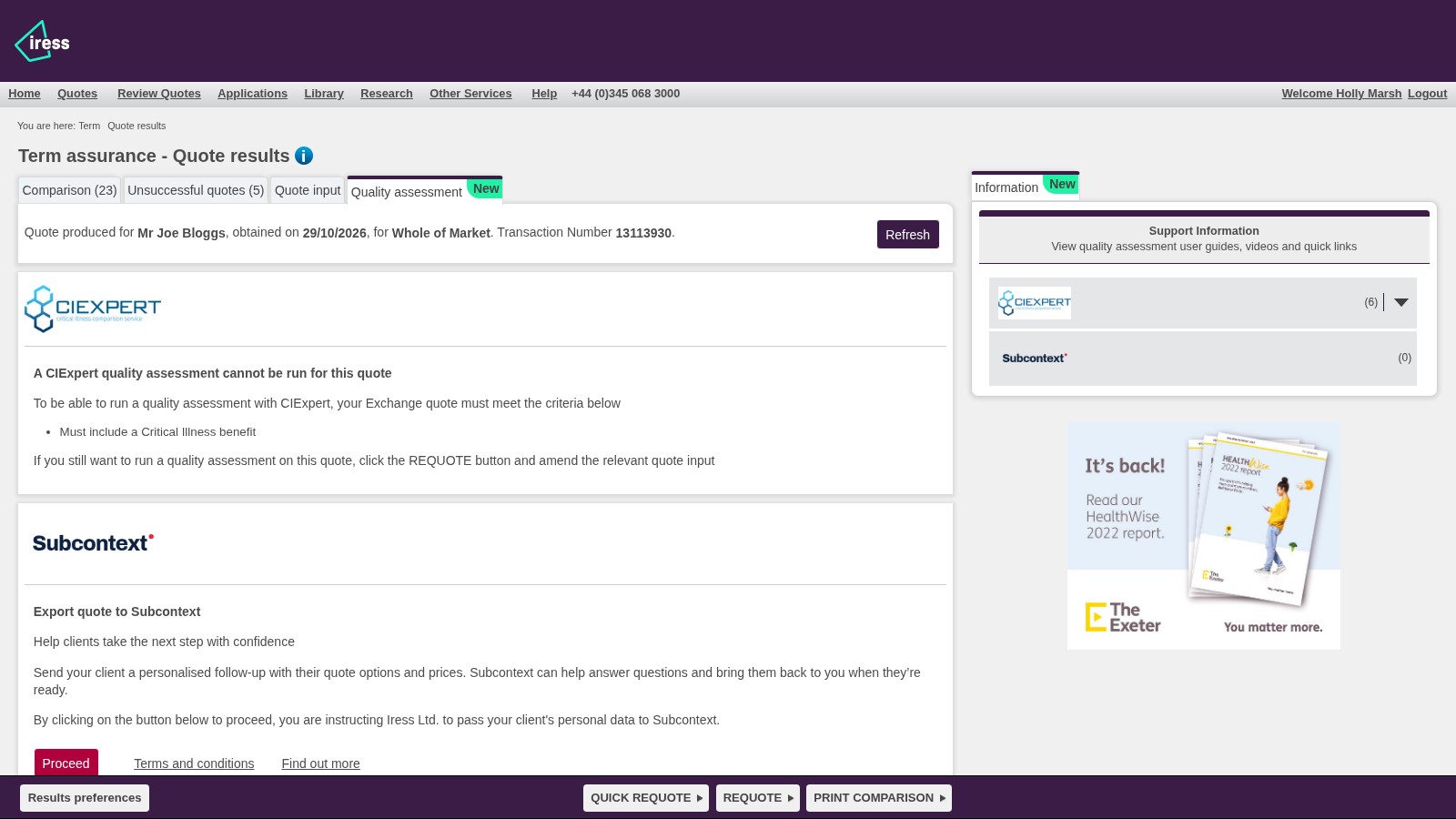
Choose Proceed on the Quality assessment tab. Your client, their cover and every price come across.
In Subcontext
The assistant drafts an email around the prices. You check it and send it.
In Subcontext
Their questions are answered straight away, from the quotes they were sent.
In Subcontext
The moment they reply, Subcontext emails you, so you pick it up while they're keen.
In The Exchange
One click takes you back to their quote in The Exchange.
In The Exchange
Take your client through the application with the insurer they chose.
IRESS × Subcontext
The Exchange compares the market in seconds. Subcontext picks up where the quote leaves off: the follow-up, the questions and the nudge to come back. Together, more of the quotes you run become applications, and every client stays with their adviser.
Rules for FCA conduct and the Consumer Duty are built in, and every reply is checked against them.
The assistant looks out for signs a client may be vulnerable and brings you in when they need a person.
Consent, every message and the reason for every reply are recorded, ready for your compliance team.
Get started
There's nothing to install and no separate sign-up. Open a quote's results in The Exchange, go to the Quality assessment tab and choose Proceed under Export quote to Subcontext. The first time, tell us who you are and which firm you're with.
Free to start. Your firm gets a free trial workspace for email follow-ups. Claim a full Subcontext account any time for SMS and WhatsApp, your own dashboard, and assistants on your website and phone lines.
Quality assessment
With a full Subcontext account
Web chat, email, SMS, WhatsApp and calls in one place, with the whole history beside each client. Step in and reply yourself whenever you like.
Follow up on the channel your client actually reads, with consent checked before every message.
Watch how it worksThe assistant offers times and books the call into your calendar, so clients come back to you ready to talk.
Watch how it worksTurn renewals, lapsed cover and quiet leads into personal conversations, one client at a time.
Watch how it worksReminders, follow-ups and hand-offs run themselves, so nothing waits on someone remembering.
Watch how it worksEvery reply is checked against your rules and recorded with the reason, ready for your compliance team.
Watch how it worksFAQ
Your firm starts with a free trial workspace, with a monthly allowance of email follow-ups. For SMS and WhatsApp, more follow-ups and the rest of the platform, claim a full Subcontext account and choose a plan. A trial that hasn't sent a follow-up for 90 days is deleted, unless you claim it first. Compare plans
Yes. The assistant drafts it from the quote and your note, and you edit it as you like. Nothing is sent until you approve it. The prices, insurers and cover amounts are added exactly as The Exchange quoted them: the AI never writes those.
No. It explains the quotes your client was sent and answers their questions, but it never makes a personal recommendation. The advice stays with you, and so does the sale.
The assistant carries the conversation on in your firm's name. It answers your client's replies straight away, helps them book a call back with you, and hands over to a person whenever they ask for one. Subcontext emails you as soon as they reply.
Yes. The first adviser from a firm sets up its workspace. A colleague who exports a quote later joins the same workspace once you, or your firm's owners, confirm them.
Every assistant starts with rules for FCA conduct and the Consumer Duty, and every reply is checked against them before it goes to your client. Each conversation keeps a full record of what was said and why, so you can show the outcome your client got.
If your client shows signs they may be vulnerable, or mentions a bereavement or money worries, the assistant brings in a person at your firm rather than carrying on alone.
Yes. Every conversation is kept with a full audit trail: each message, the rules it was checked against and why the assistant replied as it did. With a full account, your compliance team can open it in your Subcontext dashboard or download it as a PDF to hand to a regulator. The compliance record is kept for six years by default.
Your firm stays the data controller. Subcontext processes the quote and the conversation on your firm's behalf, under our Data Processing Agreement. Quotes are stored encrypted, health details from a quote are never put in a message to your client, and a quote that doesn't lead to a message is deleted after 30 days. Read more in our trust centre
Ask our assistant anything: it runs on the same software that follows your clients up. Or book a call with the team.